

 How to Unblock Whatsapp Calling in Egypt?
 How to Unblock Whatsapp Calling in Egypt?
Over the past few years, voice and video calling apps like WhatsApp, Viber, and others have been blocked in Egypt.
Many users frequently search for Vodafone Egypt Whatsapp call or Orange Egypt Whatsapp call because these mobile carriers often restrict access to such services.
So, how to unblock Whatsapp Calls in Egypt and use it to stay in touch with your family and friends?
Here’s a simple and secure solution that allows you to use Whatsapp from Egypt safely by encrypting your internet traffic and bypassing local restrictions.
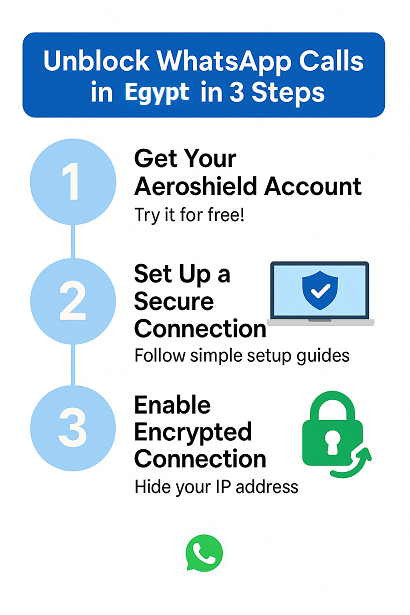
How Aeroshield Works and Helps Use WhatsApp Calls in Egypt?
In Egypt, WhatsApp calls are blocked.
But Aeroshield solves this by encrypting your internet traffic and routing it through another country where WhatsApp works normally.
This hides your real location and unblocks voice and video calls.
Just install Aeroshield on your phone (or computer, laptop — it works on all devices),
connect to a server outside Egypt, and WhatsApp calls will start working instantly.
3 Easy Steps to Use WhatsApp Calls in Egypt
You can make WhatsApp voice and video calls in Egypt securely and easily by following these 3 simple steps:
(iPhone, Android, macOS, Windows).
Stay in touch with your family and friends without any restrictions.
What Our Users Say
Ahmed M.
 Cairo, iPhone
I couldn’t make WhatsApp voice or video calls while in Egypt — nothing would go through. After installing Aeroshield on my iPhone, everything worked immediately. Smooth, fast, and finally no more restrictions!
Mohamed H.
Alexandria, Android
WhatsApp calls just wouldn’t connect here in Egypt. I tried the 3-day free trial of Aeroshield and it worked like magic — crystal clear calls over both Wi-Fi and mobile data. Highly recommended!
Luca B.
 Milan, iPhone
I was visiting Egypt and surprised that I couldn’t call home via WhatsApp. I found Aeroshield, installed it on my iPhone, and instantly had access to all calls again. Super easy to use and very stable.

Best Services for WhatsApp Calling in Egypt
Our top choice to use WhatsApp in Egypt. A speedy, privacy-conscious service with no-logs policy, and a wide range of advanced security features.
The best budget service to unblock WhatsApp calling in Egypt. With no connection limit, decent speeds, and a major focus on security, Aeroshield makes it easy to use WhatsApp safely in Egypt.
Fast and reliable, with top-notch security and privacy protections — a great service to make WhatsApp calls in Egypt.
Use Whatsapp and other voice and video call applications like IMO, Line, Viber in Egypt easy with Aeroshield!
Aeroshield essentially creates a secure, private tunnel for your internet traffic. Here’s a breakdown in simple terms:
What it does:
- It hides your IP address: Your IP address is like your computer’s home address on the internet. A VPN masks it, making it harder for websites and others to track your location and online activity.
- It encrypts your data: It scrambles your internet traffic, so if anyone tries to intercept it, they’ll see gibberish instead of your personal information.
- It routes your connection through a server: Your internet traffic goes through a server in a location of your choosing. This server then communicates with the internet.
How it helps bypass internet restrictions:
- By masking your IP address, a VPN can make it appear as if you’re browsing from a different location. This allows you to bypass geographical restrictions that some websites or services impose.
- If a government or organization is blocking access to certain websites, a VPN can help you circumvent those blocks by routing your traffic through a server in a location where those restrictions don’t apply.
- Essentially it makes it look like your internet traffic is comming from a different location, thus if content is blocked in your current location, but not the location of the VPN server, you can then see that content.
In short, a VPN adds a layer of privacy and security to your internet connection, and that added layer of security, can also be used to bypass some internet restrictions.
Whatsapp is a fantastic calling application that is extremely popular not only in Egypt but in the whole world as well. Just look at the chart below. Unfortunately, Whatsapp Voice and video Calling feature is blocked in Egypt now. How to unblock WhatsApp Calling in Egypt in three simple steps, please read below.

Whatsapp call is blocked in Egypt due to geo restrictions. To bypass such kind of Internet limits you need to mask your IP address. The best way to do that is by using a secure and anonymous service like Aeroshield.
Aeroshield service will mask your IP address and so helps to bypass any kind of Internet limits in Egypt. Unblock VOIP and any voice calling applications like Skype, Line or Whatsapp. This is easy and reliable.
#WhatsApp calls doesn’t work properly in #Egypt
—


 (@FromMaadi)
 Try Aeroshield service and forget about these problems!


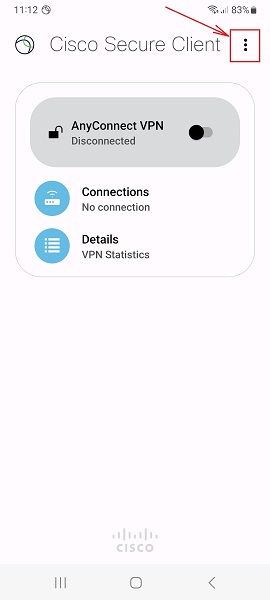
Please download and install AnyConnect VPN client by the link and follow the guide:
1. Launch “AnyConnect“ app on your Android device and tap 3 dots as shown.
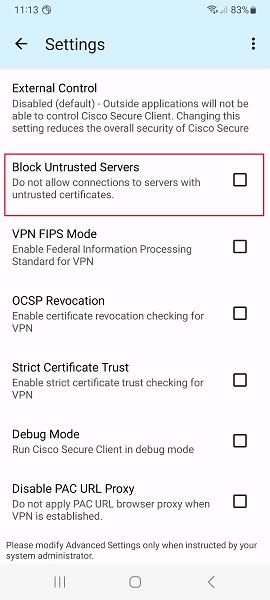
2. Disable (uncheck) Block Untrusted Servers and tap the back arrow.
3. Tap + icon to add a new connection.
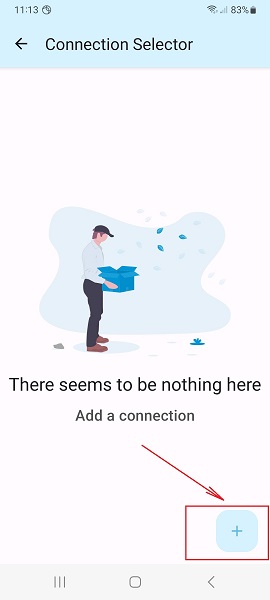
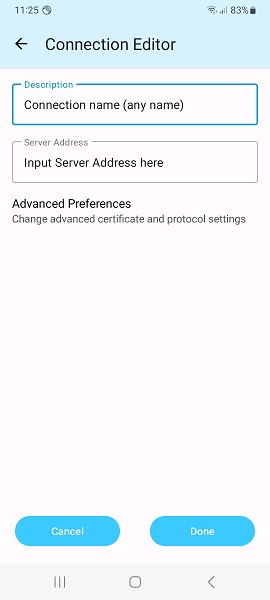
4. Fill the Description (it can be whatever you want).
Input Server Address (it is given in your account data) and tap Done and back arrow.
Note: Server Address must be exactly as in your VPN account data. No extra symbols or spaces are allowed.
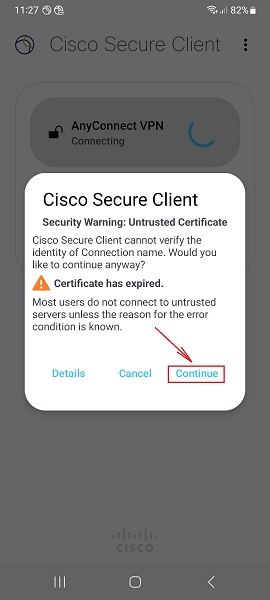
5. Switch the switcher on the main screen to the right to connect.
Tap Continue on the pop up window and enter your Username/Password on request.
Wait for the connection and enjoy the Internet.
Using a secure VPN you can unblock WhatsApp from any city like Cairo, Alexandria, Giza, Shubra El Kheima, Port Said, Suez, Luxor, Mansoura, Tanta, Asyut, and any other place in Egypt.
This is a safe and secure solution.
To setup SSL (SSTP) vpn connection in your iPhone or iPad please follow the next instructions:
1. Install Cisco Anyconnect app from App Store
2. Open Anyconnect app and in Settings section uncheck “Block Untrusted Servers” to allow it.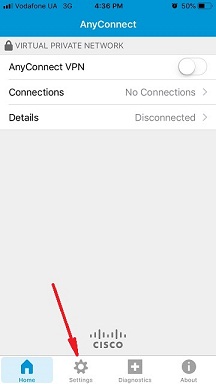
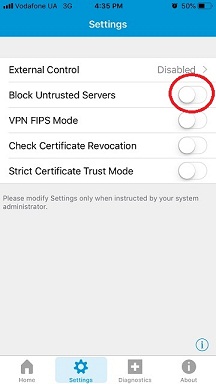
3. Back to Home, tap Connections -> Add VPN Connection.
4. Enter Description (any name) and Server Address. Tap Save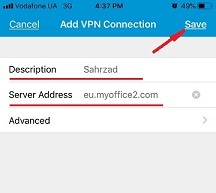
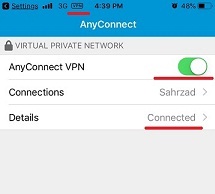
5. Swipe the AnyConnect VPN switch from OFF to ON and tap Continue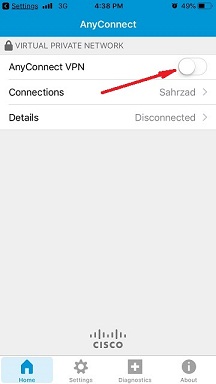
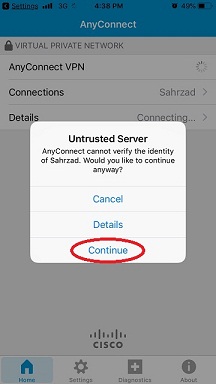
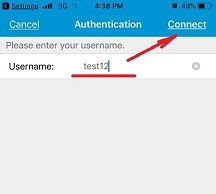
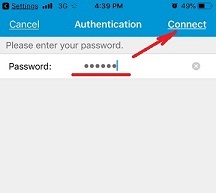
6. Input Username tap Connect, input Password and tap Connect.
7. Wait for the connection.







5 comments on “How to Unblock WhatsApp Call in Egypt [October 2026 Updated]”
[…] How to unblock Whatsapp call in Egypt […]
[…] Unfortunately, sometimes Whatsapp call can be blocked in Turkey, like it is blocked in UAE, Egypt and other countries. In such cases, you can use a VPN to enable Whatsapp in […]
[…] private messaging application is blocked in Egypt as well as many other VOIP services like Whatsapp, Skype, and many others. How to unblock Signal in Egypt and stay connected to your friends, family, […]
[…] Setup SSTP VPN in Android […]
[…] How to Unblock WhatsApp Call in Egypt [June 2023 Updated] […]