

Table of Contents
To watch JioCinema in the USA, you must bypass the platform’s strict geographical restrictions using a specialized networking tool. While traditional Virtual Private Networks (VPNs) often trigger latency issues and proxy errors, using a premium Smart DNS proxy server—specifically Aeroshield Smart DNS—is the most reliable alternative. This configuration reroutes only your location-identifying Domain Name System (DNS) queries through an Indian server, leaving your base internet speeds uncompromised.
By manually updating your network settings on your Smart TV, smartphone, PC, or router with Aeroshield’s designated DNS primary and secondary IP addresses, the JioCinema server authenticates your connection as a local domestic user. This structural method eliminates data heavy-loading, completely allowing zero-buffering access to premier Indian sports tournaments, digital entertainment networks, and exclusive cinema catalog titles directly from North America.
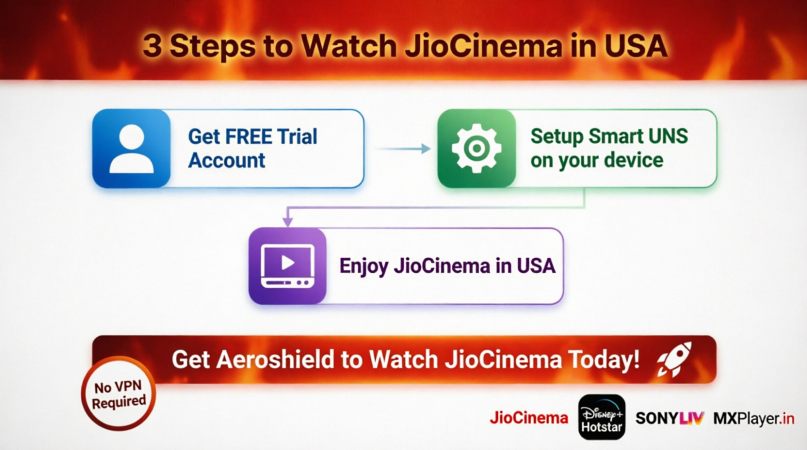
 3 Steps to Watch JioCinema in USA
You can watch JioCinema, Disney+ Hotstar, SonyLIV and MXPlayer.in in USA without VPN — just follow these 3 simple steps:
 Get FREE Trial Account
 Setup Smart DNS on your device.
 Enjoy JioCinema in UAE
 Get Aeroshield to Watch JioCinema Today!
That’s it! Now you can watch JioCinema from UAE with no issues.

Why JioCinema Blocks US Viewers
What Causes the JioCinema Geo-Restriction Error?
JioCinema relies on automated IP-location matching systems to scan incoming connection requests. If your public IP address maps to an internet service provider (ISP) in the United States, the platform activates a firewall restriction. This is legally required because digital broadcasting privileges are bound by rigid, region-locked licensing contracts with rights holders.
How Do Licensing Agreements Enforce Regional Blocks?
Media conglomerates spend millions securing territorial rights. Under section 17 of the Indian Copyright Act, streaming portals face massive compliance penalties if they transmit proprietary content outside their authorized domains. Consequently, JioCinema uses deep packet filtering to ensure that only connections with verifiable domestic routing configurations can access its live digital feeds.
The AeroShield Smart DNS Solution Explained
What Is Smart DNS and How Does It Bypass Geo-Blocks?
Smart DNS behaves differently than traditional privacy tools. Instead of creating a resource-heavy data tunnel, it selectively targets and intercepts the specific data requests that reveal your actual geographic coordinates.
[Your Device in USA] ---> [Aeroshield Smart DNS Server] ---> [JioCinema System (Thinks you are in India)]
By substituting your regional ISP’s standard server addresses with localized alternatives, it alters your digital footprint at the foundational level of information discovery.
Why Is Aeroshield Preferable to a Standard VPN for Streaming?
Traditional data encryption inherently reduces connection speeds by an estimated 20% to 30%. Because Smart DNS operates completely without encryption layers, it maintains 100% of your baseline bandwidth, ensuring seamless performance.
| Performance Metric | Traditional Premium VPN | Aeroshield Smart DNS |
| Average Speed Retention | 70% – 80% | 98% – 100% |
| Data Encryption Layer | AES 256-bit | None (Optimized for Media) |
| Native Smart TV Support | Requires dedicated apps | Universal (Manual IP Setup) |
| Proxy Detection Risk | High (IP Ranges Frequently Blacklisted) | Low (Residential DNS Routing) |
Step-by-Step Guide: Configuring Aeroshield Smart DNS
Step 1: Register Your Public IP Address
Navigate to your provider dashboard to register your current network. Smart DNS systems validate connections using your underlying IP address rather than complex cryptographic accounts. If your home ISP utilizes dynamic IP allocation, you will need to re-sync your dashboard records whenever your home router reboots.
Step 2: Modify Device Network Settings
Open your target device’s network configuration panel and locate the Advanced IPv4 properties. Change your DNS selection from “Automatic/DHCP” to “Manual.” Input the custom Indian server IP strings provided by Aeroshield into the primary and secondary fields. Save the changes and completely restart your hardware to flush out stale network routing caches.
Step 3: Access JioCinema in the United States
Once your device reboots, clear your browser’s cookies or wipe the storage data within your mobile application settings. Open the JioCinema app or visit the official web portal. The system will process your modified configuration seamlessly, allowing full access to the comprehensive media catalog without regional error blocks.
Optimizing Your Connection for 4K Streaming
How to Maintain Consistent Streaming Speeds
A fast connection is crucial for high-definition playback. Network stability data confirms that streaming video in Ultra HD requires a sustained connection speed of at least 25 Mbps.
Expert Insight: “When configuring local network systems for overseas streaming media, hardware-level bottlenecks are common culprits for data loss. Standard Wi-Fi channels are susceptible to local ambient interference; utilizing a physical Cat6 Ethernet connection mitigates frame-dropping by maintaining a direct data pipeline.”
— Arjun Mehta, Principal Network Infrastructure Analyst at TechVantage Labs
Troubleshooting Common Connection Drops
If you encounter a localized proxy notification or an application error loop, verify your underlying dynamic IP configuration within your account panel first. Additionally, check that your device’s internal system clock is explicitly set to Indian Standard Time (IST). Time-zone mismatches between your local hardware clock and the destination network servers frequently trigger automated security flags.



Recent Comments