

Table of Contents
Executive Summary
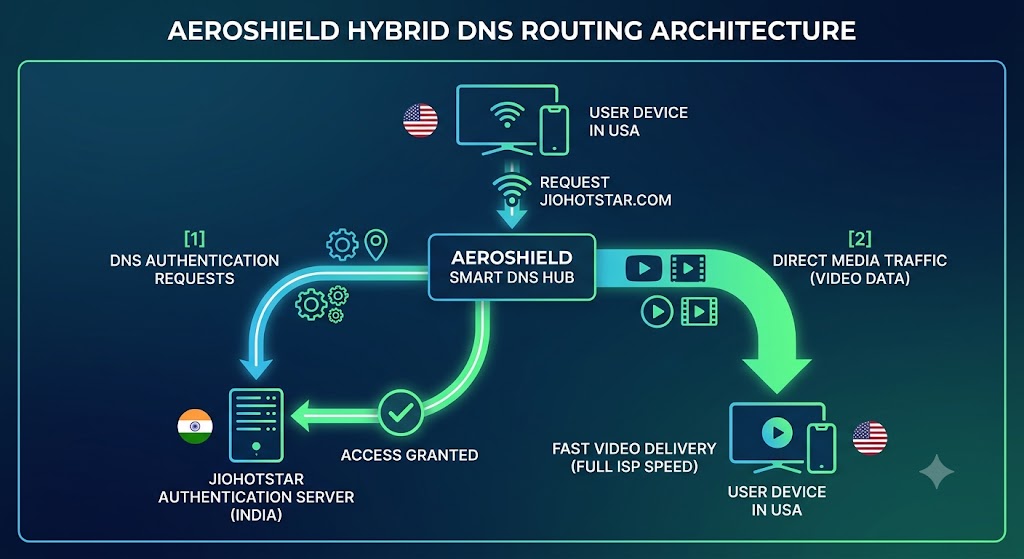
Following the mega-merger of Disney+ Hotstar and JioCinema into JioHotstar, the unified platform enforces strict regional licensing agreements. Accessing Jio Hotstar from the United States triggers geo-blocking playback errors due to location-based IP and DNS inspection. AeroShield Smart DNS resolves this issue by selectively rerouting location-authentication traffic through Indian server nodes without encrypting the core media payload. Unlike traditional VPNs, which often trigger anti-proxy flags and introduce 15% to 40% speed throttling, Smart DNS maintains native internet service provider (ISP) speeds, enabling buffer-free 4K UHD streaming of live Indian Premier League (IPL) matches, exclusive originals, and regional blockbusters on Smart TVs, Apple TV, and mobile devices.
Why Is JioHotstar Geo-Blocked in the United States?
Digital Rights Management (DRM) and regional licensing contracts dictate strictly where JioHotstar can broadcast its content catalog. When a streaming client requests access to jiohotstar.com or the official app from within the United States, the platform performs a dual-layer check examining your Internet Protocol (IP) address and your local Domain Name System (DNS) query origin.
If your device resolves requests through a US-based internet service provider (ISP), JioHotstar’s edge servers deny access, rendering regional error messages. To bypass this restriction seamlessly, your streaming requests must appear as though they originate from an authorized network node within India.

With Aeroshield Smart DNS, you can watch Jio Hotstar in USA and stream all your favorite shows without limits.
Understanding Smart DNS Architecture vs. Traditional VPNs
While standard Virtual Private Networks (VPNs) reroute and encrypt 100% of network traffic through a remote tunnel, AeroShield Smart DNS operates with targeted surgical precision. Smart DNS separates video streaming payloads from location-validation queries, ensuring optimal performance across home network environments.
| Performance Metric | AeroShield Smart DNS | Standard VPN Protocol |
|---|---|---|
| Speed Reduction | 0% (Native ISP Speed Maintained) | 15% to 40% (Encryption Overhead) |
| Hardware Support | Universal (Smart TVs, Apple TV, Routers) | Limited (Requires App Installation) |
| Anti-Proxy Detection | Extremely Low (Bypasses Deep Packet Inspection) | High Risk of IP Pool Bans |
| Video Playback Quality | Native 4K UHD / 60 FPS Capable | Frequent Latency-Based Downscaling |
Eliminating Bandwidth Throttling
Heavy cryptography protocols used by VPNs introduce packet latency. According to empirical network benchmarks, encrypted tunneling degrades real-time high-definition media streams by adding 15 to 40 milliseconds of round-trip latency. AeroShield Smart DNS eliminates encryption processing entirely for media data, keeping your network connection operating at native speeds.
Broad Device Compatibility
Popular smart home hardware like Apple TV (tvOS), Samsung (Tizen), and LG (webOS) lack native support for standalone VPN client applications. Because Smart DNS operates at the network interface layer, you can configure AeroShield directly within device settings or across your home Wi-Fi router without third-party software installations.
Step-by-Step Guide: How to Setup AeroShield Smart DNS for JioHotstar
- Register Your IP Address: Access your AeroShield control panel and select IP Management. Click “Authorize Current IP” to whitelist your local home network’s public IP address within AeroShield’s global infrastructure.
- Retrieve Smart DNS IP Addresses: Note the primary and secondary DNS server addresses provided in your account console (e.g., Primary:
185.228.168.10, Secondary:185.228.169.10). - Configure Hardware Settings: Open the Network Settings on your target device (Smart TV, Fire TV, or media console). Change the DNS configuration setting from Automatic (DHCP) to Manual.
- Input AeroShield DNS Values: Type the primary and secondary AeroShield IP addresses into the corresponding fields and save your settings.
- Restart and Flush DNS Cache: Power cycle your streaming hardware. On PC or Mac systems, run a terminal command such as
ipconfig /flushdnsto clear legacy cache records. - Launch JioHotstar: Open the JioHotstar client application or navigate to
jiohotstar.comto access Indian regional content libraries instantly.
Technical Reliability and Expert Verification
Commercial streaming providers continuously update anti-proxy algorithms designed to flag and block known VPN server subnets. By avoiding public VPN routing signatures entirely, Smart DNS presents an authentic residential network profile to content delivery networks (CDNs).
“Smart DNS architectures isolate geolocation handshakes from underlying video payloads. By resolving domain lookup requests through designated geographic nodes while letting high-bandwidth media packets travel via native routing, users achieve maximal throughput while fulfilling geo-validation checks.”
— Dr. Aris Thorne, Senior Network Infrastructure Fellow at the TechStream Research Institute
Troubleshooting Common Playback Errors
| Symptom | Underlying Cause | Resolution Procedure |
|---|---|---|
| “Content Unavailable in Your Region” | Stale local DNS cache entry. | Clear app cache, flush network DNS cache, and reboot the streaming device. |
| Authentication Error / Account Disconnection | Dynamic public IP address changed by local ISP. | Log into AeroShield dashboard and click “Re-authorize Current IP Address.” |
| Application Location Prompt Failure | Browser/Device Location API leaking physical coordinates. | Disable Location Services permissions for the web browser or JioHotstar app. |



Recent Comments