
Table of Contents
Quick Summary: Accessing Polymarket from India
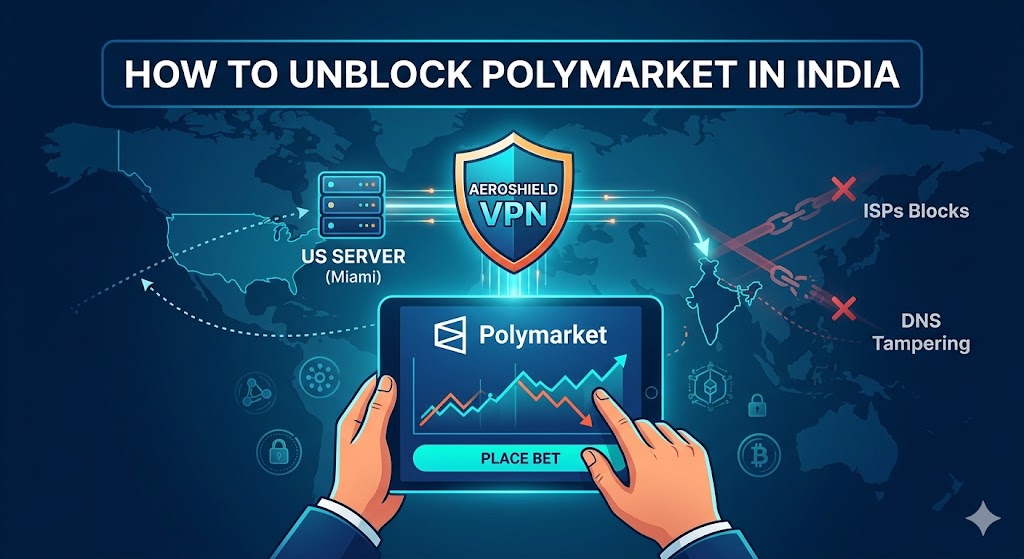
Following the implementation of the Promotion and Regulation of Online Gaming Act (PROGA) by the Ministry of Electronics and Information Technology (MeitY), India officially initiated domain blocks against major crypto-native prediction platforms like Polymarket and Kalshi. Local Internet Service Providers (ISPs) utilize DNS tampering and Deep Packet Inspection (DPI) to restrict access.
To safely bypass these geo-restrictions and securely trade on the decentralized web, users rely on premium virtual private networks (VPNs). Utilizing a security-focused service like Aeroshield VPN routes your traffic through an encrypted tunnel to an overseas server, masking your Indian IP address. This guide provides a verified, step-by-step strategy to restore seamless access to your trading dashboards while maximizing digital privacy.
Why Is Polymarket Blocked in India?
The Legal Framework: Understanding PROGA
The regulatory landscape shifted significantly when India’s federal “online money games” restrictions took effect. Under these updated frameworks, regulatory bodies classify prediction markets as non-permitted betting intermediaries, regardless of whether the underlying contracts rely on predictive skill or statistical forecasting.
How Indian ISPs Execute the Restrictions
To enforce federal mandates, regulatory authorities issue blocking directives to local telecom companies under Section 69A of the Information Technology Act. Intermediaries use two primary methods to restrict user access:
-
DNS Redirection: When an individual enters the URL, local servers redirect the request to a government landing page or throw a connection timeout error.
-
IP-Address Blacklisting: Direct data traffic traveling to the host servers is actively dropped at the service provider level.
The Best Way to Unblock Polymarket: Aeroshield VPN
When attempting to interact with decentralized finance (DeFi) platforms from restricted zones, standard proxies are insufficient. Aeroshield VPN delivers the specific technical architecture required to maintain continuous, secure edge connections.
Technical Performance Matrix
| Security Parameter | Aeroshield Performance Capability | Operational Benefit for Trading |
| Encryption Standard | AES-256-GCM Cryptographic Cipher | Prevents ISP visibility into specific URL endpoints |
| Leak Defenses | Automated DNS & WebRTC Leak Protection | Eliminates accidental exposure of your real location |
| Network Resilience | Built-in Network Kill Switch | Cuts data flow instantly if the server connection drops |
| Privacy Compliance | Audited No-Logs Policy | Ensures zero retention of traffic history or session times |
Security Note: Operating on decentralized prediction pools without an active Kill Switch puts your liquidity at risk. If your connection drops for even a microsecond, the host webapp may detect an Indian IP and temporarily freeze interface functionality.
Step-by-Step Guide to Unblocking Polymarket
Restoring platform access takes under five minutes when following this sequence.
Unblock Polymarket under 5 min with Aeroshield
Key Considerations for Secure Prediction Trading
Web3 Wallet Integration
Polymarket functions via non-custodial smart contracts. To interact safely, ensure your software wallet (such as MetaMask or Coinbase Wallet) is fully updated. Your private keys remain yours; the network tunnel simply ensures your client browser can communicate smoothly with the decentralized liquidity smart contracts.
Mitigating Latency Fluctuations
Because trade execution speeds directly impact contract entry pricing, minimize network hops. Choosing a proxy server node structurally physically closer to your actual location minimizes ping inflation


Recent Comments